Get in touch
EN

Infrastructure and support · Tajikistan

SERVER INFRASTRUCTURE SELECTION AND CONFIGURATION

Server infrastructure selection and configuration. From application requirements to deployment, access and recovery arrangements.

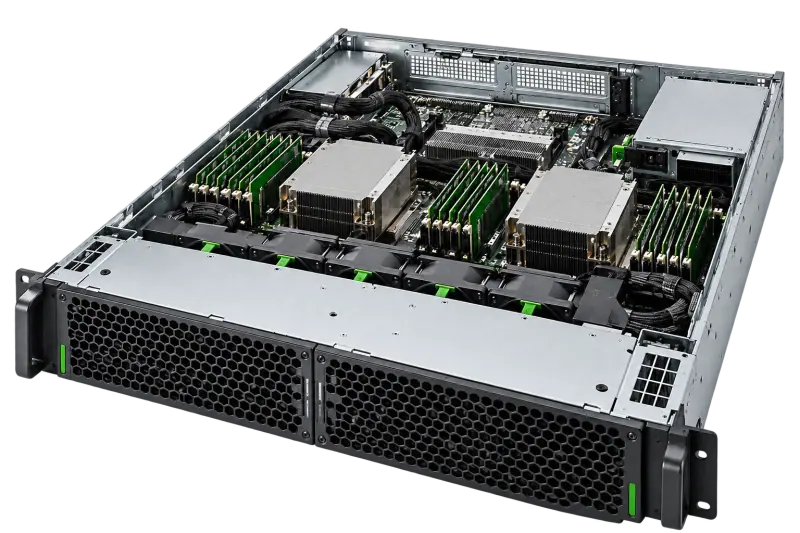
Server with accessible internal components

01 / Service scope

From your task
to a solution.

Processors and drives cannot be selected independently of the application. We clarify workload, developer requirements, acceptable downtime and room conditions.

Configuration sizing

Compute, memory and storage.

Learn more

We consider users, data volume, growth and workload type. Accounting systems, databases and virtualisation requirements are checked separately. A disk array improves availability for certain failures but does not replace a backup.

Deployment and access

Power, cooling and administration.

Learn more

We check racks, installation depth, power, networking and cooling. Administrator access, updates and account management are agreed separately. Remote management must not mean exposing its interface directly to the internet.

Deployment and recovery

We test the working scenario.

Learn more

Agree backups and a maintenance window before changes. After configuration, test applications, permissions and agreed metrics. Migration needs a rollback procedure; starting the server alone does not prove all data was transferred successfully.

02 / Process

A clear process.
At every step.

01

Clarify the task

The details needed to get started.

Learn more

Review applications, users, data volume and availability requirements. For an existing system, provide server, licence and backup information.

02

Assess and propose

A clear scope and estimate.

Learn more

Select compute, memory and storage alongside deployment conditions. Access, backup and recovery are considered separately from RAID.

03

Agree and carry out

Agree costs and changes before proceeding.

Learn more

Agree the configuration, licences, maintenance window and migration plan. Changes to existing systems stay within the approved scope.

04

Check at handover

Check the result against the agreed task.

Learn more

Check application startup, access and the agreed recovery scenario. At handover, document settings and ongoing administration arrangements.

03 / Result

Agreed scope.
Clear results.

Commissioning is checked against agreed applications, access and recovery scenarios. For migration, define the maintenance window, data checks and rollback plan separately.

  • Configuration for applications and workload
  • Checks of permissions and agreed functions
  • Backup, recovery and handover conditions

04 / Pricing

What determines
the price.

The estimate considers applications, users, data volume, configuration and installation environment. Migration, backups and licences are specified separately when included.

  • 01Applications and workload
  • 02Drives and redundancy
  • 03Licensing
  • 04Migration, deployment and support

Across almost all of Tajikistan.
Terms to suit the task.

We handle enquiries from almost all of Tajikistan. Delivery, handover or an on-site visit, if needed, are agreed for your city in advance. Terms depend on the address, task and specialist availability; this page does not imply identical service times in every locality.

05 / Useful information

Good questions.
Clear answers.

Can an existing server be used?

After assessing configuration, condition and application support. Upgrading individual parts is not always more economical than replacement.

Is RAID enough to protect data?

No. User error, malware and corrupted data can affect the whole array. A separate backup and recovery strategy is needed.

Are licences included?

OS, virtualisation and application licences are separate items or explicitly included in the specification.

What should be prepared before migrating to a new server?

Prepare application dependencies, data volume, a backup and an agreed maintenance window. Define result checks, the acceptance owner and a rollback procedure in advance.


Related services

Let’s discuss the next step

Tell us
about your requirements.

State applications, users, data volume, existing server and whether you need a new installation or migration. Add installation conditions and the maintenance window; do not send access credentials.

+992 44 655 00 00info@nekon.tj

We use your contact details to respond to your request. Do not send passwords or confidential files.

What are you looking for?

Start with a service or equipment name.

NEKON Assistant

Demo · answers from our guide

Hello! I can help you find equipment, a service or contact details. I am a demo assistant using the company guide, with no AI connection.

Do not send passwords or payment details.